Indicator states on NinjaTrader 8
This page covers the Pulling & Stacking Indicator on NinjaTrader 8, where it runs as an indicator, in its own panel under the price chart.
The indicator does not present dead or unseeded output as signal. This is state display, not data filtering: the engine keeps reading the raw stream, and the display says what state the data is in.
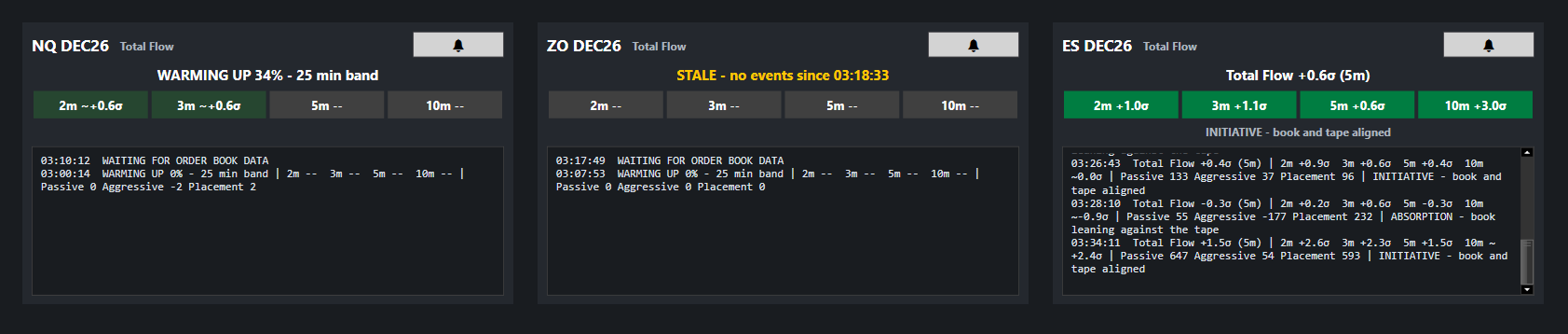
Warming up
The indicator comes up in stages, so you are not left waiting on a blank panel. With the default settings (5-minute primary window, 5× lookback):
| After | What you get |
|---|---|
| 5 min (one window) | The flow lines. Total, Passive and Aggressive Flow are exact once one full window has been seen. |
| 10 min | A fully seeded 2-minute reading in the headline, e.g. Total Flow +1.9σ (2m) - 5m band 40%, and a provisional band on the chart. |
| 15 min | The 3-minute reading takes over the headline. |
| 25 min | The primary band is fully seeded: Total Flow +4.2σ (5m). Alerts can fire. |
| 50 min | The 10-minute ladder cell is live. |
Provisional readings are estimates. Until a band has its full lookback it
rests on few independent samples and tends to be too narrow, so early σ values
read high. They are marked so you can tell: a ~ before the value
(5m ~+2.1σ), a muted badge colour in the console, and a grey band on the
chart. A line or band drawn grey has not warmed up yet (or the data is stale);
it takes its own colour once it is fully seeded. Provisional readings never
trigger alerts.
Before the first stage the console shows progress:
WARMING UP 12% - 25 min band. Each window warms independently, so the
ladder fills in from left to right.
Ways to shorten the wait
- The indicator warms from live data. NinjaTrader does not supply historical order book depth, so the lines start from the moment you add the indicator and the bars loaded before it stay flat. Several charts of the same contract share one flow engine, so a second chart of a contract that is already warm is warm at once.
- Leave the platform running. The indicator loads with the platform and warms while you do something else.
- Most setting changes do not restart the warm-up. NinjaTrader starts the indicator again at every OK or Apply (even for a plot colour), and the flow engine for the contract carries on: the warm-up and the instrument's log in the console are kept. It starts over if Level Depth or Count Levels Entering The Depth changes (a different measurement), if nothing has fed it for a minute (the indicator was removed and added back later), or if a Market Replay jumps back. Changing the S/R Lookback Multiplier re-warms the bands over the new lookback without touching the flow lines.
- A shorter Primary Window or S/R Lookback Multiplier warms faster, but changes what the readings mean; see calibrating the parameters.
Stale
A data stream that stops without notice can look like "flow went quiet", which reads as information when it is an outage. If no events arrive for the configured number of seconds (default 30):
- the chart lines are drawn grey,
- the tile headline turns orange:
STALE - no events since 09:41:07, - the ladder shows
--, - alerts are suppressed until events resume.
Waiting for order book data
WAITING FOR ORDER BOOK DATA means the instrument has not delivered a single
depth event yet: no depth subscription, or a market that has not opened. If the
connection sends no depth, the tile's state line says No Level II depth received.
In Market Replay it means the day being played has no Market Replay data (see
replay).
Order book data stopped
If trades keep arriving but the order book has not changed for the stale timeout
(30 seconds by default), the tile shows, in orange,
! ORDER BOOK DATA STOPPED - trades are arriving but the book is not updating, so Passive Flow is frozen. Check the Level II feed; alerts are paused.
The lines are drawn grey, and alerts and arrows pause until the order book
updates again. The stale timeout is the Stale After (Seconds) setting; keep
it at 10 seconds or more. Check your Level II subscription for the instrument.
Shallow order book
If the feed gives at most half as many price levels per side as Level Depth
(and at least one), on its fuller side, for 10 seconds, the tile's state line
starts with, in orange,
! SHALLOW BOOK - the feed gives fewer levels per side than the Level Depth of 10, so the readings cover only those levels.
(with your Level Depth). The indicator goes on working, but it measures only the
levels the feed delivers, so a higher Level Depth adds nothing. Lower
Level Depth to what the feed gives, or use a feed with deeper market depth.
The warning clears once the feed gives more levels again.
Paused
PAUSED means the indicator is not producing output on this computer, and the
chart stays empty. The text after it says why, for example
PAUSED - could not reach the licence server: check your internet connection,
the indicator runs only while it can confirm the licence online and starts again
once it connects. If the key was not accepted, Licence Status in the
indicator's properties says why (see
activating your licence).
PAUSED - licence required (see the indicator settings) means no licence is
active on this computer: enter your key and activate it.
PAUSED - accept the terms or check the remote configuration means the Terms
and Conditions are not accepted yet (see terms & legal).
The same message, in full, is in Global notifications. For the first seconds
after the indicator starts, while the licence is checked, the tile reads
PAUSED - checking your licence; it is not a fault.
Replay
NinjaTrader's Market Replay (the Playback connection) is read the way live data
is, on the replay's own time: the 2, 3, 5 and 10 minute windows, the warm-up, the
bands, the alerts and the arrows all run on the replay's time, not the computer's
clock, at 1x and at faster speeds. The replay gets its own tile in the console,
named after the instrument with (replay), and its own warm-up from where it
starts; a jump back starts the warm-up again, and the tile's log says so. A replay
tile never shows STALE (a paused replay is not stale). Back on a live
connection, the live tile comes back.
Passive Flow and the deep-book readings need market depth in the replay data:
download Market Replay data for the day under Tools > Historical Data
(Get Market Replay data), one instrument and one date at a time. If a day's file
is missing, NinjaTrader still draws that day's bars, but no depth or trades
arrive and the tile stays on WAITING FOR ORDER BOOK DATA; move the Playback
slider again once the data is downloaded.
Next: notifications
Chart images. The chart images on this site show the indicator's display on market data, to explain what it draws. They are not trading results or trade recommendations, and the risk and hypothetical performance disclosures above apply to them. We publish no trading performance. The full text is on the disclosures page.