Quantower settings reference
This page covers the Pulling & Stacking Indicator on Quantower, where it runs as an indicator, in its own panel under the price chart.
Open the indicator's settings with the gear beside the indicator's short name on
the chart (for example P&S 5m, after its Primary Window).
Quantower's settings window has no OK or Apply button: each change applies as soon
as you make it, and Quantower restarts the indicator. The flow engine keeps
running across it, so most changes keep the warm-up, the lines already drawn, the
arrows and the console log; changing Level Depth or Count Levels Entering The
Depth starts the warm-up again, and changing the S/R Lookback Multiplier warms the
bands again over their lookback.
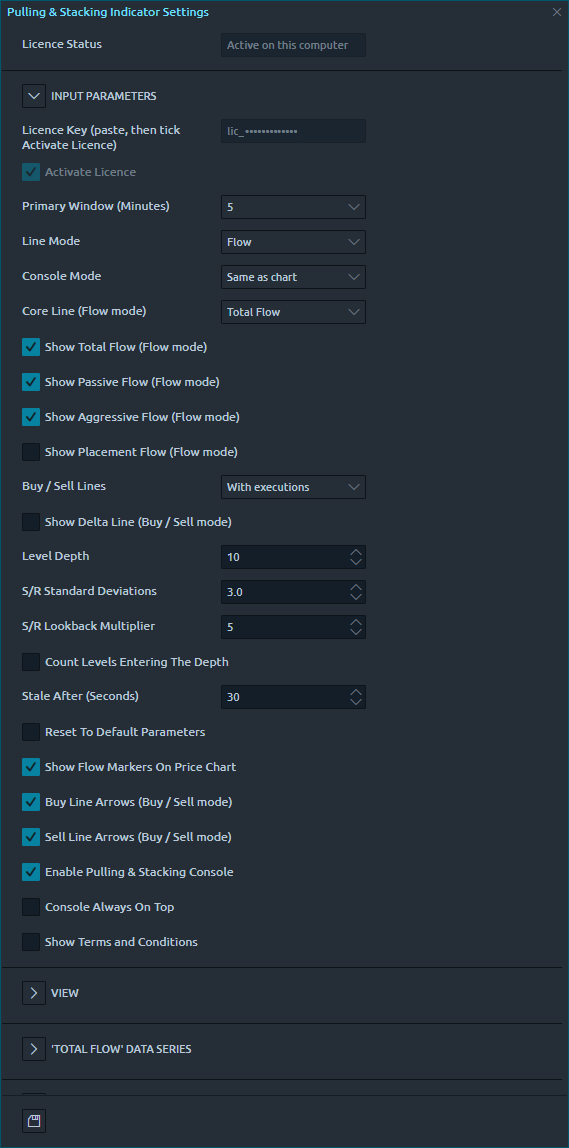
Licence
| Setting | Meaning | Default |
|---|---|---|
| Licence Status | What the licence is doing on this computer, for example Active on this computer. Read only; hold the pointer over it for the whole message. |
|
| Licence Key (paste, then tick Activate Licence) | Paste the key from your purchase email, then tick Activate Licence. Greyed out while the licence is active on this computer, when it shows only the start of the key. | |
| Activate Licence | Tick to activate the licence key above on this computer. While the licence is active the box stays ticked and greyed out. See activating your licence. | Off |
Indicator
| Setting | Meaning | Default |
|---|---|---|
| Primary Window (Minutes) | Which window (2, 3, 5 or 10 minutes) drives the lines, the band and the alerts. | 5 |
| Line Mode | Flow or Buy / Sell. See line modes. | Flow |
| Console Mode | What this instrument's console tile and its alerts read: Same as chart, Flow or Buy / Sell. A Buy / Sell console on a Flow chart warms its band over the full lookback (25 minutes at the defaults). See Console Mode. | Same as chart |
| Core Line (Flow mode) | Total, Passive or Placement Flow. The band, the arrows and the console follow it. | Total Flow |
| Show Total / Passive / Aggressive / Placement Flow | Which Flow lines are drawn. | On, on, on, off |
| Buy / Sell Lines | With executions or Placement only. | With executions |
| Show Delta Line | Buy / Sell mode: draws Buy minus Sell, in white, with no band. | Off |
| Level Depth | How many bid and ask price levels are measured. Changing it starts the warm-up again. It also affects how often the deep-book warning appears. | 10 |
| S/R Standard Deviations | Width of every Resistance / Support band. | 3 |
| S/R Lookback Multiplier | Lookback of every band, and of the warm-up, as a multiple of each window. Changing it starts the bands' warm-up again. | 5 |
| Count Levels Entering The Depth | Off: a price level that moves into the top Level Depth levels adds only its change in size. On: its full size counts as newly stacked each time price brings it into range, which gives larger, more price-driven readings. Changing it starts the warm-up again. | Off |
| Stale After (Seconds) | With no market data for this long, the console shows STALE. |
30 |
| Reset To Default Parameters | Tick it to go back to the defaults: Primary Window 5, Flow mode, Console Mode Same as chart, Total Flow, the default lines, Level Depth 10, 3 standard deviations, lookback 5. | Off |
Console and arrows
| Setting | Meaning | Default |
|---|---|---|
| Show Flow Markers On Price Chart | Master switch for the arrows. Arrow colours are fixed: green up is bullish, red down is bearish. | On |
| Buy Line Arrows / Sell Line Arrows (Buy / Sell mode) | Which of the two lines draw arrows. | On, on |
| Enable Pulling & Stacking Console | Shows the shared console. Closing the console with its close box unticks it, and the console stays closed until you tick it again on a chart. | On |
| Console Always On Top | Keeps the console in front of Quantower's windows, but not in front of a settings window while one is open. One setting for the one console: the chart where it was changed last decides. | Off |
| Show Terms and Conditions | Tick it to read the terms again. | Off |
| Release This Computer | In its own group at the bottom. Tick it to stop using your licence on this computer; it applies at once. See release this computer. | Off |
Line colours
Line colours and styles are in Quantower's own line settings for the indicator. A line that the chart does not draw (the other mode, or switched off) is hidden and shows no value. Each band has two entries there: the band itself (dotted, fully seeded) and the same band "(provisional)" (dashed). The defaults: Total Flow cyan, Passive Flow grey, Aggressive Flow orange, Placement Flow violet, Buy Line green, Sell Line red, Delta Line white.
Alerts
Alert thresholds are set in the console: the bell on the instrument's tile, and Global notification settings. See notifications. The default global threshold is 3σ.
Chart images. The chart images on this site show the indicator's display on market data, to explain what it draws. They are not trading results or trade recommendations, and the risk and hypothetical performance disclosures above apply to them. We publish no trading performance. The full text is on the disclosures page.